Best Laser Engravers for Home Shops in 2026
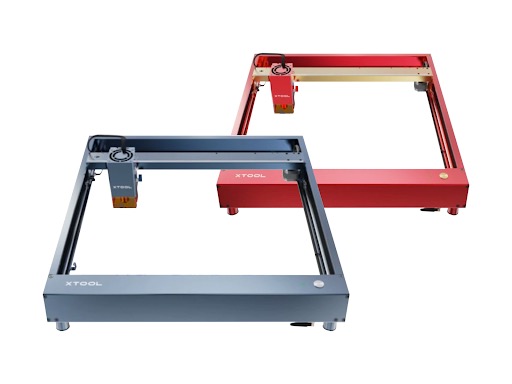
Laser engravers and cutters for home shops fall into two fundamentally different categories: diode lasers and CO2 lasers. The choice between them determines what materials can be processed, what thickness can be cut, and what the total cost of ownership looks like. According to manufacturer specifications, diode lasers in the 10-20W optical power range can engrave wood, leather, anodized aluminum, and some acrylics, while CO2 lasers at 40W and above can cleanly cut acrylic, leather, fabric, and thicker wood — and engrave glass, which diode lasers cannot.
This guide evaluates five laser engravers spanning $200 to $5,000 based on published manufacturer specifications, focusing on laser type and power, work area, speed, material compatibility, and safety features.
Diode vs. CO2 Lasers — When Each Type Matters
Understanding the difference between diode and CO2 laser technology is the most important decision in this category. The two are not interchangeable.
Diode lasers (typically 445nm blue wavelength) are compact, affordable, and effective for engraving wood, leather, dark acrylic, cardboard, and marking anodized or painted metals. Per manufacturer documentation, modern diode modules in the 10-20W optical power range can cut 3-10mm plywood in a single pass depending on wood type and speed settings. Diode lasers struggle with clear acrylic (the beam passes through it), glass (cannot engrave it), and any reflective or light-colored material without surface treatment.
CO2 lasers (10,600nm infrared wavelength) operate at a wavelength that is absorbed by a much wider range of materials. According to laser industry data, CO2 lasers can cut and engrave acrylic (including clear), wood, leather, fabric, rubber, paper, glass (engraving), and coated metals. They cannot cut bare metal — that requires fiber lasers at significantly higher price points. CO2 tubes degrade over time and require replacement (typically 2,000-8,000 hours depending on tube quality), adding to long-term cost.
The decision framework: If the primary work involves engraving wood and leather with occasional light cutting, a diode laser at $200-$900 handles it capably. If the work requires cutting acrylic, engraving glass, or processing a wide range of craft and commercial materials, a CO2 laser at $2,500-$5,000 is the appropriate tool.
Top Laser Engravers by Specification
xTool D1 Pro 20W — Best Overall Diode Laser
| Specification | Value |
|---|---|
| Laser Type | Diode (dual-beam compressed) |
| Optical Power | 20W |
| Wavelength | 455nm |
| Work Area | 430 x 390mm (16.9” x 15.4”) |
| Engraving Speed | Up to 400mm/s |
| Spot Size | 0.08 x 0.06mm |
| Materials | Wood, leather, acrylic (dark), cardboard, anodized aluminum, painted metal |
| Enclosure | Optional (sold separately, ~$200) |
| Software | xTool Creative Space, LightBurn compatible |
| Connectivity | USB, Wi-Fi (via xTool hub) |
| Price Range | $700-$900 |
Per xTool’s documentation, the D1 Pro uses a dual-beam compression design that combines two 10W diode beams into a single spot, achieving 20W of optical output with a focus spot of 0.08 x 0.06mm. According to the manufacturer’s specifications, this enables cutting up to 10mm basswood in a single pass at reduced speeds and engraving at up to 400mm/s on compatible materials.
The frame uses a 60W motor on the Y-axis for consistent movement at higher speeds. Per xTool’s data, the unit includes limit switches for homing, a flame detector, and gyroscope-based tilt protection that halts the laser if the machine is bumped or moved during operation.
The open-frame design means this machine operates without a built-in enclosure. xTool sells an enclosure accessory for approximately $200, which is strongly recommended for eye safety and fume management. Without an enclosure, appropriate laser safety glasses (OD 5+ at 455nm) and ventilation are essential.
Best for: Home shop makers and small businesses who need versatile engraving across wood, leather, and similar materials with a capable open-frame platform.
Ortur Laser Master 3 — Best Budget Diode Laser
| Specification | Value |
|---|---|
| Laser Type | Diode |
| Optical Power | 10W |
| Wavelength | 455nm |
| Work Area | 400 x 400mm (15.7” x 15.7”) |
| Engraving Speed | Up to 20,000mm/min (333mm/s) |
| Spot Size | 0.05 x 0.05mm |
| Materials | Wood, leather, dark acrylic, cardboard, paper, anodized aluminum |
| Enclosure | No (aftermarket available) |
| Software | LaserGRBL, LightBurn compatible |
| Connectivity | USB, SD card |
| Price Range | $200-$350 |
According to Ortur’s specifications, the Laser Master 3 delivers 10W of optical power with a compressed spot size of 0.05 x 0.05mm — tighter than the xTool D1 Pro, which can produce finer engraving detail on suitable materials. Per the manufacturer’s data sheet, the machine can cut 5-6mm plywood in a single pass at reduced speed settings.
The Laser Master 3 uses a 32-bit motherboard and is compatible with LaserGRBL (free) and LightBurn ($60 for a perpetual license), both of which are established laser control platforms. Per Ortur’s documentation, the unit includes active position protection and a flame detection sensor.
At roughly one-third the price of the xTool D1 Pro 20W, the Ortur sacrifices cutting power — 10W versus 20W means slower cuts and thinner maximum cutting depth. For buyers whose primary use is engraving rather than cutting, the reduced power may be an acceptable tradeoff given the price difference.
Best for: Budget-conscious makers and hobbyists who prioritize engraving over cutting and want a capable machine under $350.
Atomstack X20 Pro — Best Mid-Range Diode Laser
| Specification | Value |
|---|---|
| Laser Type | Diode (quad-beam compressed) |
| Optical Power | 20W |
| Wavelength | 455nm |
| Work Area | 400 x 400mm (15.7” x 15.7”) |
| Engraving Speed | Up to 600mm/s (with firmware update) |
| Spot Size | 0.08 x 0.06mm |
| Materials | Wood, leather, acrylic (dark), cardboard, anodized aluminum, stainless steel marking |
| Enclosure | No (aftermarket available) |
| Software | LaserGRBL, LightBurn compatible |
| Connectivity | USB, offline controller available |
| Price Range | $500-$700 |
Per Atomstack’s product documentation, the X20 Pro uses a quad-beam compression module that focuses four laser diodes into a single point to achieve 20W optical output. According to the manufacturer’s specifications, this enables cutting up to 12mm basswood and 8mm black acrylic in a single pass at optimal settings. Atomstack also lists stainless steel marking capability — surface discoloration via heat, not actual cutting or deep engraving.
The frame construction uses an all-metal rail system. Per Atomstack’s data, the machine includes an air-assist nozzle as standard equipment — a feature that the xTool D1 Pro offers only as an add-on accessory. Air assist blows a stream of compressed air at the cutting point, clearing smoke and debris for cleaner cuts and reducing flare-up risk on wood.
The included air-assist and competitive pricing position the X20 Pro as a strong mid-range option. The tradeoff compared to the xTool is ecosystem maturity — xTool’s Creative Space software and accessory lineup are more developed according to available product documentation.
Best for: Makers who want 20W cutting power with included air assist at a lower price than the xTool, and who are comfortable using third-party software like LightBurn.
Glowforge Pro — Best Enclosed CO2 Laser
| Specification | Value |
|---|---|
| Laser Type | CO2 |
| Power | 45W |
| Wavelength | 10,600nm |
| Work Area | 495 x 279mm (19.5” x 11”) |
| Engraving Speed | Up to 4,000mm/min (per manufacturer) |
| Spot Size | Not published |
| Materials | Wood, acrylic (all types), leather, fabric, paper, glass (engraving), Corian, rubber, coated metal |
| Enclosure | Yes (fully enclosed, Class 1 rated) |
| Software | Glowforge cloud app (subscription-free basic, Pro features included) |
| Connectivity | Wi-Fi (cloud-based, requires internet) |
| Price Range | $4,000-$5,000 |
According to Glowforge’s specifications, the Pro model uses a 45W CO2 laser tube in a fully enclosed, Class 1 laser safety rated housing. Per FDA/CDRH classification, Class 1 means the enclosure prevents hazardous laser exposure during normal operation — no safety glasses required while the lid is closed. The unit includes an integrated exhaust fan and requires routing a 4-inch duct to an exterior vent or through a compatible air filter (sold separately for approximately $1,000).
Per Glowforge’s documentation, the Pro includes a passthrough slot on the front and back of the unit, allowing materials longer than the 19.5-inch bed to be fed through for extended cuts. The cloud-based software handles design upload, material settings, and job execution through a web browser — no desktop software installation required.
The primary tradeoff is the cloud dependency. According to Glowforge’s terms, the machine requires an active internet connection to operate. Jobs are processed on Glowforge’s servers. If their service is unavailable, the machine cannot run. The CO2 tube is also a consumable — Glowforge’s documentation indicates a rated lifespan, after which replacement is required at significant cost (tube replacement pricing varies; contact Glowforge directly).
Note: Glowforge is sold exclusively through glowforge.com. It is not available on Amazon or through third-party retailers.
Best for: Makers and small businesses who want a plug-and-play CO2 laser with full enclosure safety, wide material compatibility, and minimal setup complexity — and who are comfortable with cloud-dependent operation.
OMTech 55W CO2 Laser Engraver — Best Value CO2 Laser
| Specification | Value |
|---|---|
| Laser Type | CO2 |
| Power | 55W |
| Wavelength | 10,600nm |
| Work Area | 400 x 600mm (16” x 24”) |
| Engraving Speed | Up to 500mm/s |
| Spot Size | ~0.1mm (varies by focus) |
| Materials | Wood, acrylic (all types), leather, fabric, paper, glass (engraving), rubber, Corian, coated metal |
| Enclosure | Yes (fully enclosed with viewing window) |
| Software | RDWorks, LightBurn compatible (Ruida controller) |
| Connectivity | USB, Ethernet |
| Price Range | $1,500-$2,500 |
Per OMTech’s product data sheet, this 55W CO2 unit uses a glass CO2 tube and a Ruida RDC6445 controller — a widely used industrial controller with an established user community and extensive documentation. According to the manufacturer’s specifications, the 55W tube can cut up to 10mm acrylic, 8mm wood, and engrave glass, leather, fabric, and coated metals.
The 400 x 600mm work area is substantially larger than the Glowforge Pro’s 495 x 279mm bed, particularly in the Y-axis. Per OMTech’s documentation, the machine includes a motorized Z-axis for focus adjustment, a red dot pointer for alignment, and an integrated exhaust fan.
At roughly one-third to one-half the price of the Glowforge Pro, the OMTech delivers more laser power and a larger work area. The tradeoffs are setup complexity and software polish. The OMTech requires manual alignment of the mirror path (a multi-step process documented in the manual), water cooling setup (external chiller or pump required, typically $100-$300), and learning RDWorks or purchasing a LightBurn license. None of this is prohibitively difficult, but it requires more technical comfort than the Glowforge’s out-of-box experience.
The CO2 tube is a consumable with a rated lifespan of approximately 2,000-6,000 hours depending on usage patterns and power settings. Replacement tubes for OMTech machines are widely available from third-party suppliers at $100-$250 — significantly less expensive than proprietary replacements.
Best for: Makers and small businesses who want CO2 cutting and engraving capability with a larger work area at a fraction of premium brand pricing, and who are comfortable with manual setup and mirror alignment.
Full Comparison Table
| Specification | xTool D1 Pro 20W | Ortur LM3 | Atomstack X20 Pro | Glowforge Pro | OMTech 55W CO2 |
|---|---|---|---|---|---|
| Laser Type | Diode | Diode | Diode | CO2 | CO2 |
| Power | 20W optical | 10W optical | 20W optical | 45W | 55W |
| Work Area | 430 x 390mm | 400 x 400mm | 400 x 400mm | 495 x 279mm | 400 x 600mm |
| Max Speed | 400mm/s | 333mm/s | 600mm/s | ~67mm/s | 500mm/s |
| Enclosure | Optional | No | No | Yes (Class 1) | Yes |
| Clear Acrylic | No | No | No | Yes | Yes |
| Glass Engraving | No | No | No | Yes | Yes |
| Software | xTool CS / LightBurn | LaserGRBL / LightBurn | LaserGRBL / LightBurn | Glowforge cloud | RDWorks / LightBurn |
| Connectivity | USB, Wi-Fi | USB, SD | USB | Wi-Fi (cloud) | USB, Ethernet |
| Price | $700-$900 | $200-$350 | $500-$700 | $4,000-$5,000 | $1,500-$2,500 |
Safety Considerations
Laser engravers present specific safety hazards that vary by laser type and enclosure design.
Eye safety: According to FDA/CDRH regulations (21 CFR 1040), open-frame diode lasers are Class 4 devices — direct or reflected beam exposure can cause permanent eye damage instantly. Appropriate OD 5+ laser safety glasses matched to the laser wavelength (typically 445-455nm for diode, 10,600nm for CO2) are mandatory when operating open-frame machines. Enclosed machines rated Class 1 (like the Glowforge Pro and OMTech) prevent beam exposure during normal operation.
Fume extraction: All laser engravers produce smoke and fumes when processing material. Per manufacturer documentation, cutting or engraving wood produces fine particulate and volatile organic compounds. Cutting acrylic produces fumes that, according to material safety data, should not be inhaled. PVC and vinyl must never be processed in any laser — they release chlorine gas, which is toxic and corrosive to the machine. Adequate ventilation (duct to exterior or activated carbon filtration) is essential for any indoor laser operation.
Fire risk: Diode and CO2 lasers can ignite flammable materials. Per manufacturer safety guidelines, never leave a laser engraver operating unattended, keep a fire extinguisher within reach, and use air assist when cutting wood to reduce flame risk.
Who This Is NOT For
Laser engravers are versatile tools, but they are not the right solution for every application:
-
If the primary goal is cutting metal. Neither diode nor CO2 lasers cut bare metal. Diode lasers can mark anodized or painted surfaces, and CO2 lasers can engrave coated metals, but cutting steel or aluminum requires a fiber laser ($5,000-$20,000+) or a plasma cutter. See our guide to plasma cutters under $1000 for metal cutting options.
-
If production volume and speed are critical. Home-shop laser engravers operate at a fraction of the speed of industrial units. A batch of 500 engraved items that takes 2 hours on an industrial Epilog or Trotec may take 10-15 hours on a home-shop machine. For production engraving businesses, the throughput limitation becomes a bottleneck.
-
If the workspace lacks ventilation. Operating a laser engraver in an unventilated room is a health hazard. Fume extraction to the outdoors or through a quality filtration system is not optional. Standalone filtration units add $300-$1,000 to the setup cost.
-
If deep 3D engraving or carving is the primary application. Laser engravers remove material by ablation — vaporizing thin layers. Deep relief carving (more than 1-2mm depth) is extremely slow and produces inconsistent results. A CNC router is the appropriate tool for deep 3D carving in wood or similar materials.
-
If consistent results on reflective materials are needed. Diode lasers are particularly unreliable on light-colored, reflective, or transparent materials. Without surface treatment (paint, marking spray), the beam may reflect or pass through the material entirely.
Sources
- xTool D1 Pro 20W technical specifications and product documentation (xtool.com)
- Ortur Laser Master 3 product specifications and user manual (ortur.tech)
- Atomstack X20 Pro manufacturer documentation and specifications (atomstack.com)
- Glowforge Pro product specifications and safety documentation (glowforge.com)
- OMTech 55W CO2 Laser Engraver product data sheet and user documentation (omtechlaser.com)
- FDA/CDRH laser product safety regulations — 21 CFR 1040
- LightBurn software documentation (lightburnsoftware.com)
- Laser Institute of America — laser safety guidelines